Free template
Who's over, who's idle, and which project is about to blow its hours?
You usually find out at the end of the month, when the timesheets land. This sheet shows you in week two.
Capacity problems don’t announce themselves. The developer who’s quietly on three projects at once doesn’t say so until something slips. The account manager with half a week free doesn’t either. And the project that was going to take 300 hours has used 240 of them by the time anyone adds it up.
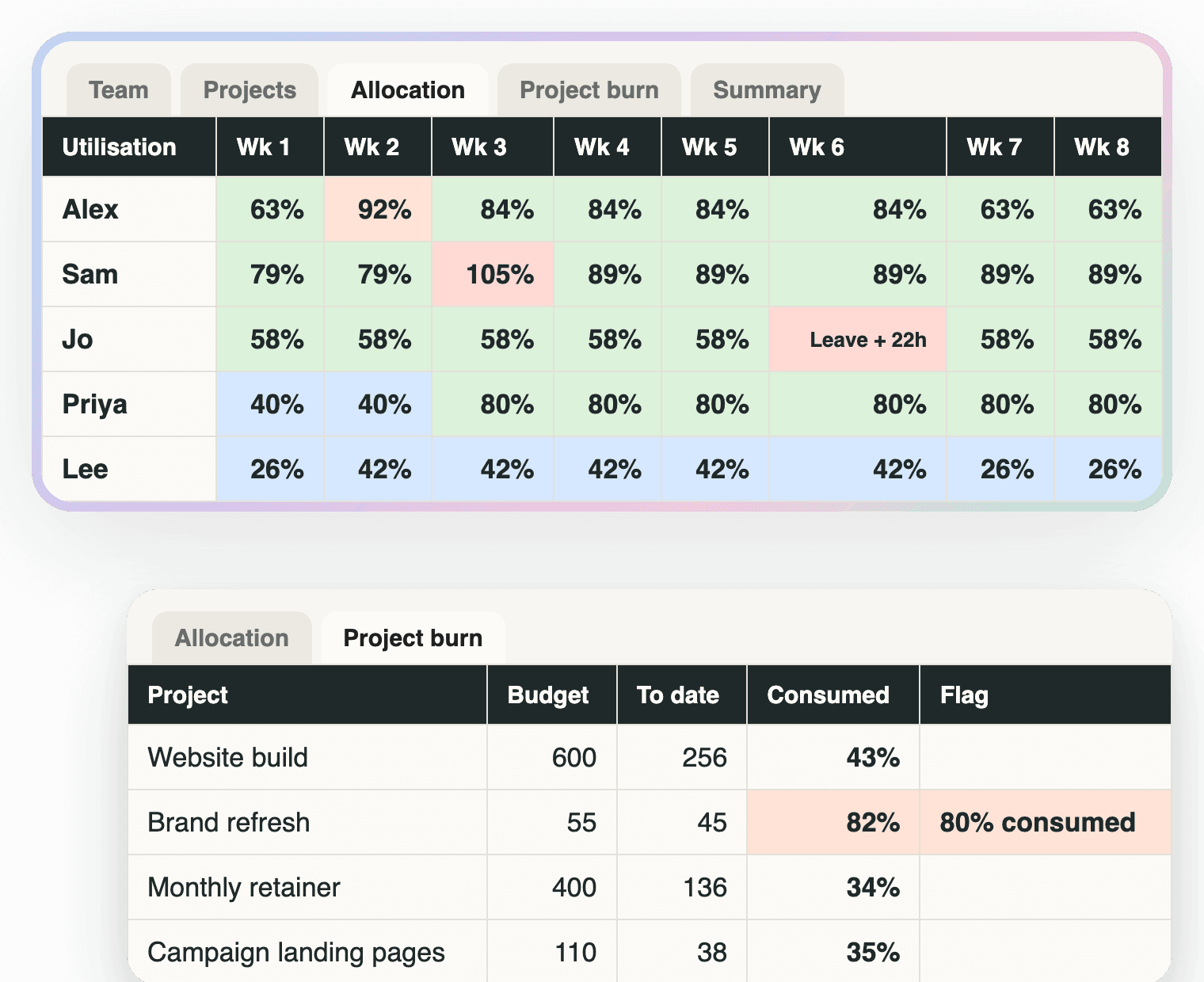
This is a 12-week grid that adds it up as you plan, not after. One row per person per project, planned hours across the weeks, and a grid on top that goes red the moment anyone is over capacity, amber when they’re close, and blue when they’re sitting under half... because unsold hours are a cost too.
What’s inside
Start here
How to use it in seven lines, the one caveat, and which thresholds the flags use.
Team
Up to 12 people: role, weekly capacity in hours, billable target, and any weeks they're on leave. Leave weeks zero that person's capacity so a planned hour there shows up red.
Projects
Up to 15 projects: client, project, budgeted hours, start and end week.
Allocation
One row per person per project, planned hours across 12 weeks. The grid at the top shows each person's utilisation per week: red over 100%, amber over 90%, blue under 50%.
Project burn
Per project: hours allocated to date against budget, percent consumed, projected finish week at the current pace, and a flag at 80% and 100%. Those are the thresholds Handl's default alerts use.
Summary
Utilisation per person over the 12 weeks against their billable target, agency utilisation, which weeks each person is over, and every project past 80% of budget.
The same checks, live
The sheet is the manual version
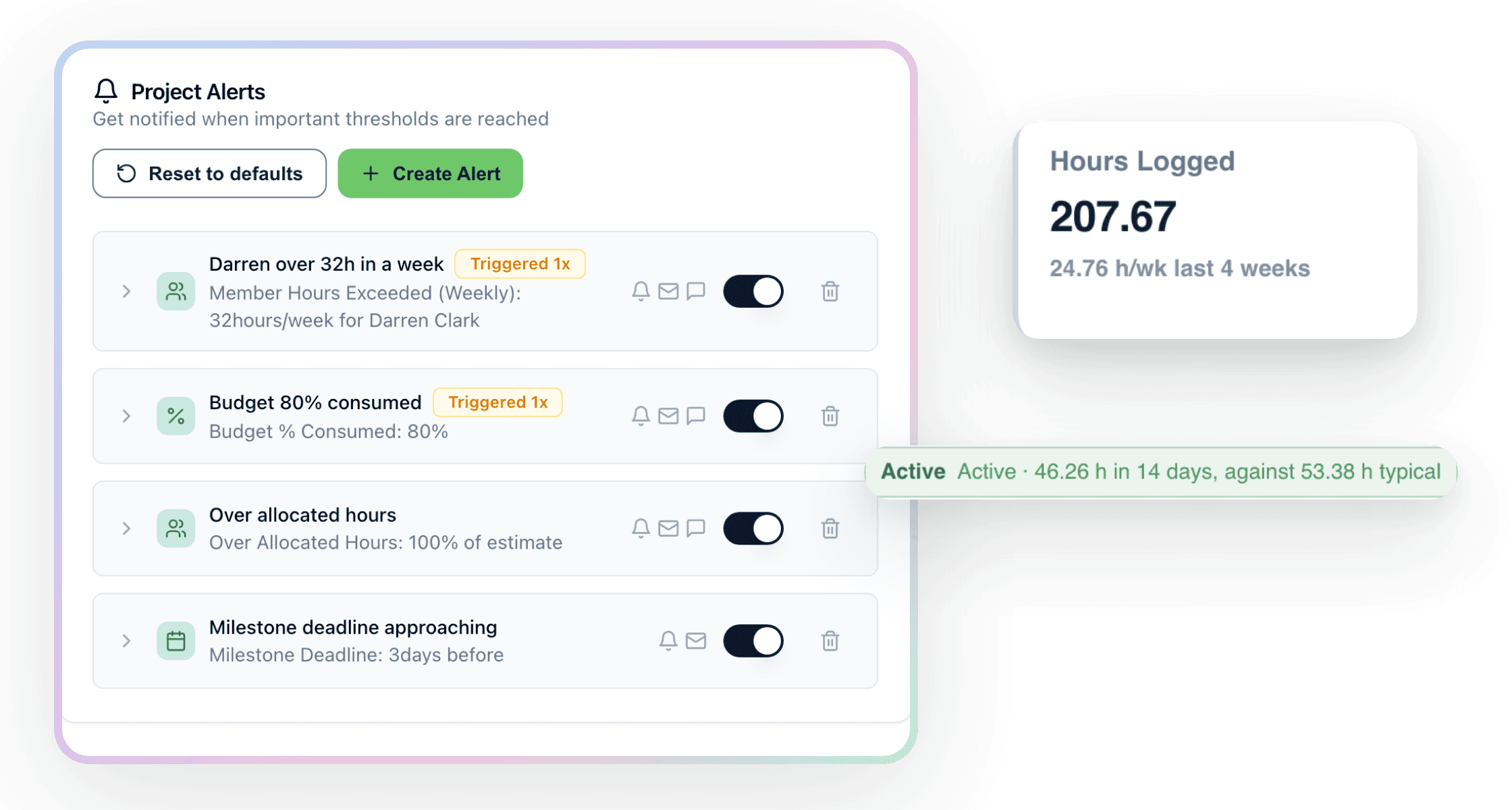
In Handl every new project starts with default alerts: hours over allocation, budget 80% consumed, a milestone deadline coming up. Add a weekly limit for a person and it pings you by email, in the app or in Slack the week they go over, not the month after. Hours are advisory, so nothing stops the work... you just find out in time to do something about it.
Start with the sheet. When you’re tired of filling in the grid, the alerts are already waiting in Handl.
Worth knowing
Not a resourcing system, and not accounting advice
It’s a planning sheet. It won’t pull timesheets or nag anyone. Fill in just next week for everyone before you do anything else... the red cells are the point. The people and projects marked Example are there to show how the formulas hang together; delete them and add your own.
Handl watches this live. Every project gets default alerts for hours over allocation, budget 80% consumed and milestone deadlines, and you can add per-person weekly limits that ping email, Slack or the app. For why this matters as you grow, read the agency growth ceiling guide.
Free download
Get it free
Drop your email and the planner lands in your inbox. The download link is on screen too, so you're not waiting on email.
Not accounting advice, and it won't replace a resourcing tool. It'll show you in week two what the timesheets would have told you at the end of the month.

Reclaim your time
Stop being your own debt collector.
Get paid faster with automated invoicing and reminders.